
Your Echo Dot’s light is stuck on orange. Or you’re trying to change the Wi-Fi and it just won’t turn orange. Sound familiar?
I tested everything below in October 2026 on an Echo Dot (5th gen) and an Echo Dot (3rd gen) with the latest Alexa app here in Japan. The app screenshots are in Japanese, so I’ve added what each label means.
💡 Quick answer
・Flashing yellow after you shop on Amazon? That’s a notification. It’s easy to mistake for orange, so ask Alexa to read it
・Real orange (setup mode) won’t go away on its own. Unplug for 10 seconds, plug back in, and wait about 40 seconds
・A red light isn’t a fault. It means the mic is off
1. First, check the color
Your Echo Dot uses its light to tell you what’s going on. Here are the main colors, according to Amazon’s help pages.
| Light | Meaning |
|---|---|
| Orange | Setup mode, or trying to connect to the internet |
| Yellow (slow pulse every few seconds) | You have a notification or message |
| Cyan and blue, slowly spinning | Starting up |
| Red | Microphone off |
| Purple | A Wi-Fi problem during setup (also flashes briefly in Do Not Disturb mode) |
| Green | Incoming call, or on a call |
💡 Orange and yellow can be hard to tell apart, depending on your room’s lighting. On my 3rd gen, the yellow notification light actually looks yellow-green. Don’t go by color alone; just ask Alexa.
2. Flashing yellow? That’s a notification (easy to mistake for orange)
When you order something on Amazon, your Echo Dot lets you know with its light. When I actually filmed it, it was flashing yellow. Amazon’s help pages describe the notification light as yellow, too.
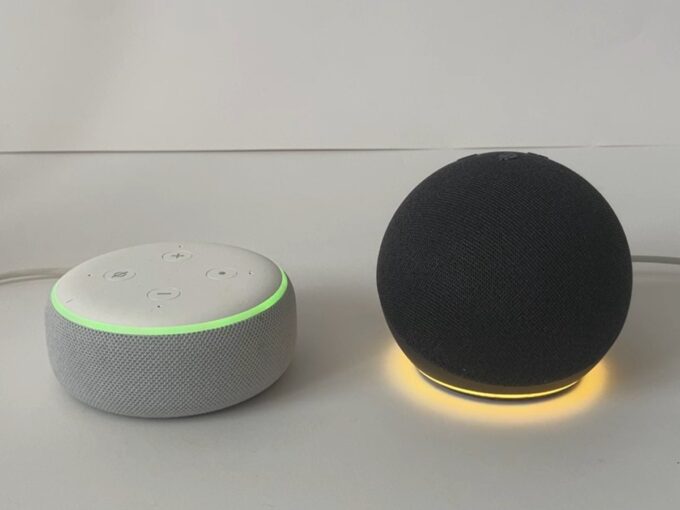
The easiest check is to ask. On Echos set up in Japan, I talk to Alexa in Japanese, so here are the phrases I used:
- アレクサ、通知を教えて (Arekusa, tsūchi o oshiete) = “Alexa, tell me my notifications.” Alexa reads them out (asking for 通知設定, tsūchi settei, “notification settings,” worked too)
- アレクサ、通知を消して (Arekusa, tsūchi o keshite) = “Alexa, clear my notifications.” This turned the light off at my place
Here’s the kind of thing Alexa read out to me. On October 28, it said: “You have a notification from Amazon Shopping. Your canned tuna is arriving today.”
- Something you bought is scheduled for delivery today
- It’s about time to reorder an item you buy regularly. Would you like to order it?
💡 Amazon’s help pages suggest 通知はある? (tsūchi wa aru?) (“Do I have notifications?”) and メッセージを読んで (messēji o yonde) (“Read my messages”).
💡 Both of my Echo Dots lit up for the notification, but only the 5th gen answered when I asked. The 3rd gen’s light just went off.
By the way, reminders looked different: a cyan-and-blue spin that flashed.
Want fewer notifications? You can change them in the Alexa app.
- On the home screen, tap the bell in the top right
- On the 通知 (Notifications) screen, tap the gear in the top right
- Choose Amazonショッピング (Amazon Shopping)
- Turn things like 配送の通知 (Delivery notifications), 注文内容の確認 (Order confirmations) and おすすめ商品 (Recommendations) on or off
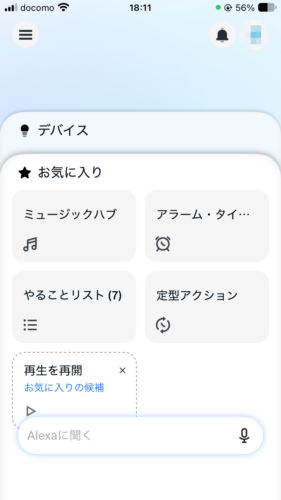
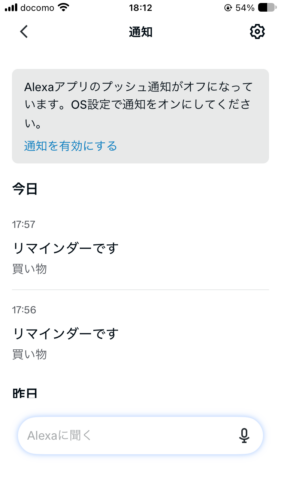
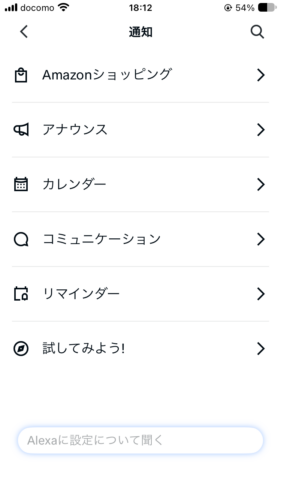
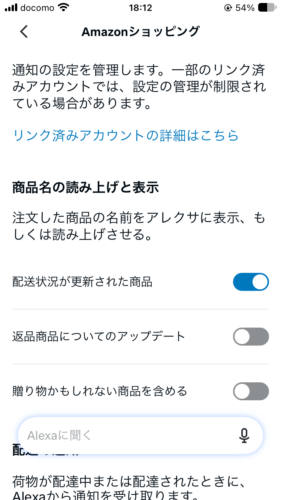
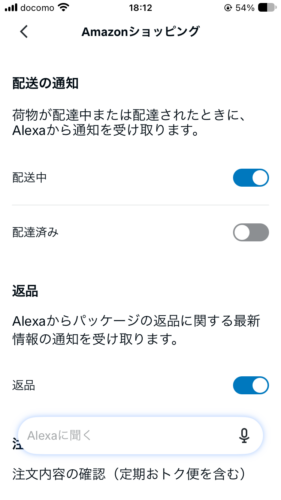
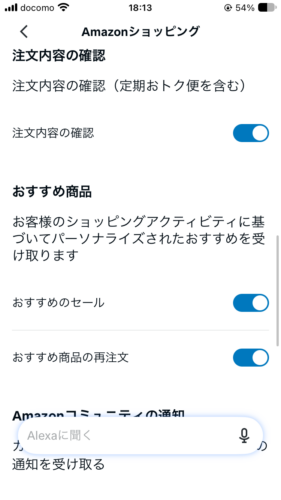
💡 On my account, 配送中 (Out for delivery) and おすすめ商品の再注文 (Reorder recommendations) were turned on. If you’re getting a lot of delivery or “Would you like to order?” notifications, start there.
3. Stuck on orange? Get out of setup mode
If it’s not a notification and the light stays orange, your Echo Dot is probably in setup mode. Holding a button a bit too long can do it by accident.
I put mine into setup mode and left it alone. After 10 minutes, it was still orange. It doesn’t time out.
Here’s the fix:
- Unplug your Echo Dot’s power adapter
- Wait 10 seconds
- Plug it back in
- Wait for the cyan-and-blue spin to finish and the light to go off
Mine answered “Alexa” about 40 seconds after I plugged it back in.
💡 Don’t talk to it straight away after a restart. Give it about 40 seconds after the light goes off.
If you went into setup mode on purpose to change networks, carry on with How to Change Your Echo Dot’s Wi-Fi in Japan.
4. Won’t turn orange? Getting into setup mode
To change Wi-Fi, the Alexa app asks you to put your Echo Dot into setup mode (orange). The button depends on the model.
| Model | Button to hold | Time to orange (mine) |
|---|---|---|
| Echo Dot (5th gen) | Action button | About 10 seconds |
| Echo Dot (3rd gen) | Action button | About 5 seconds |
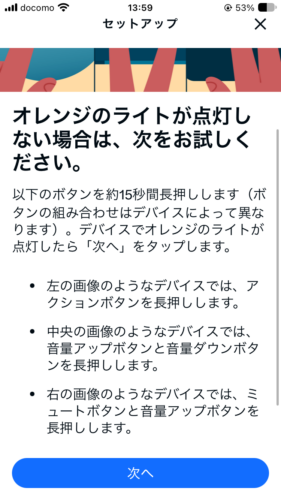
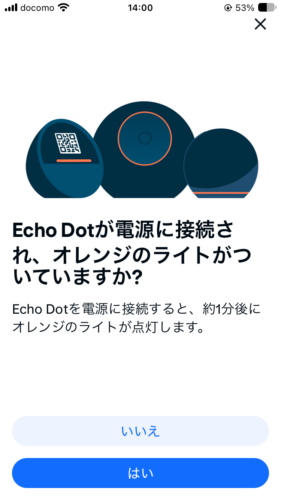
Still not orange? Try these in order:
- Keep holding a little longer, until it turns orange
- Unplug for 10 seconds, plug back in, then try again
- If that fails, reset it (see the tip below)
💡 Amazon lists two ways to reset an Echo Dot (2nd–5th gen):
・Hold the Action button for 20 seconds: resets but keeps your smart home connections
・Hold Volume down and Mic off together for 20 seconds: factory reset (erases everything)
Either way, it goes back into setup mode and you’ll need to set it up again. I didn’t try a reset for this article.
5. Red light? The mic is off
A red light isn’t a Wi-Fi problem or a fault. It means the microphone is off.
I tried it on both models. With the red light on, neither one responded to “Alexa.” The Alexa app didn’t show anything different, either.
💡 The app won’t tell you the mic is off. Just press the mic button on top of your Echo Dot again.
6. The app says “Online,” but it won’t respond
I unplugged my Echo Dot and checked the Alexa app. The device list still said オンライン (Online).
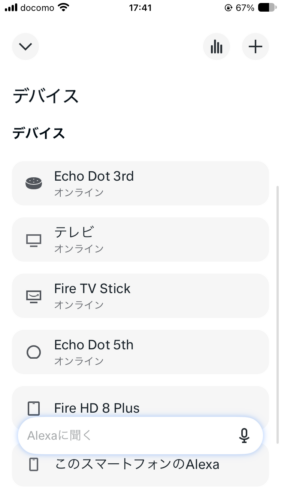
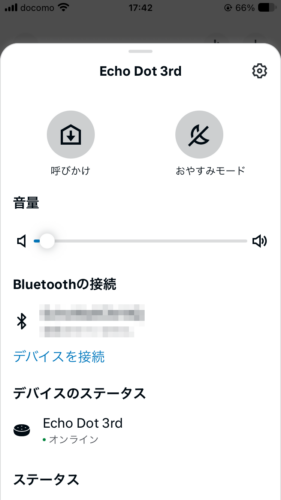
When I tapped デバイスのステータス (Device status), a ネットワークエラー (Network error) screen popped up. Back on the list, it now said デバイスが応答していません (Device is not responding).
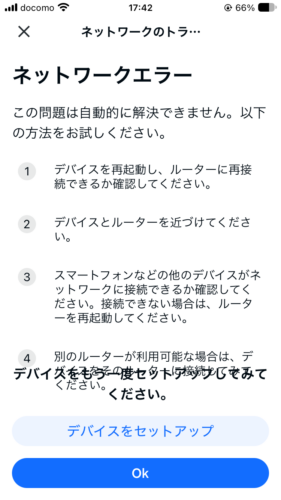
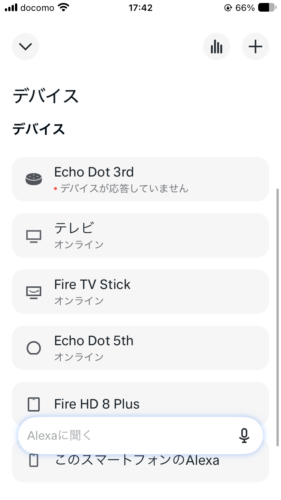
💡 The app’s “Online” label doesn’t always update right away. If something feels off, tap the device status to see what’s really going on.
The Network error screen suggested these fixes:
- Restart the device and check it can reconnect to your router
- Move the device and router closer together
- Check whether your phone or other devices can get online (if not, restart the router)
- If you have another router, try connecting to that one
Still stuck? Set the device up again. The full steps are in How to Change Your Echo Dot’s Wi-Fi in Japan.
7. The bottom line
- Flashing yellow after shopping is a notification (easy to mistake for orange). Say アレクサ、通知を教えて (Arekusa, tsūchi o oshiete)
- Real orange (setup mode) doesn’t time out. Unplug for 10 seconds, plug back in, wait about 40 seconds
- To get orange, hold the Action button (about 10 seconds on the 5th gen, about 5 on the 3rd gen)
- Red = mic off. Press the mic button again
- The app’s “Online” label can lag. Tap the device status to check
Sources: Amazon: Echo light indicators, Amazon: Yellow light on your Echo, Amazon: Reset your Echo Dot (2nd–5th gen) (all checked October 2026; Amazon pages are in Japanese)
See the Echo Dot (5th Gen) on Amazon Japan: Charcoal / Glacier White
This article is based on hands-on testing by the author. AI tools such as Claude were used to assist with research and drafting, and the author reviewed the content before publishing.