
Live in Japan and own an Echo? Then you already have a radio. Say 「アレクサ、ラジコでJ-WAVEをかけて」 and Tokyo’s J-WAVE starts playing in seconds!
I tested everything below in October 2026 on an Echo Dot (5th gen) in Tokyo, using the latest Alexa app and a free radiko account. The screenshots are from the Japanese version of the app, so I’ve added the English meaning of each button.
💡 Quick answer: Local stations work by voice, for free. Stations outside your area need radiko Premium. Catch-up listening (time-free) did not work on Echo.
1. Turn on the radiko skill
- Open the Alexa app and tap その他 (More) → スキル・ゲーム (Skills & Games), then search for “radiko”
- Tap radiko, then 開始 (Start)
- Pick the device you want to use (here, Echo Dot 5th) and tap 開始 again
- When you see the confirmation screen, you’re done
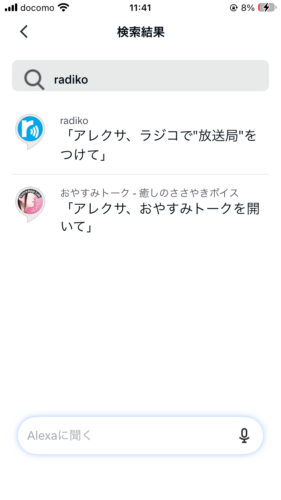
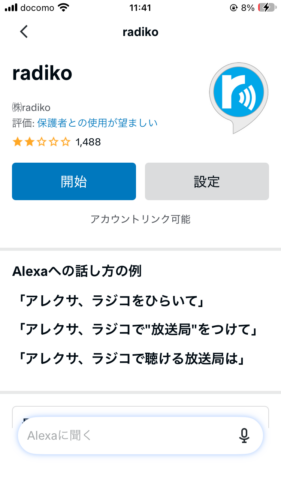
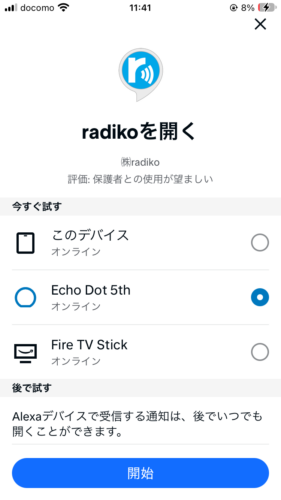
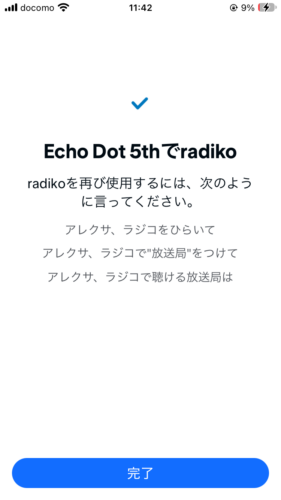
The whole thing takes less than five minutes. The final screen even shows a few phrases you can try right away.
2. What to say: my test results
Here’s what happened when I tried each phrase in Japanese on a free account in Tokyo.
| What I said | How to say it (romaji) | What happened |
|---|---|---|
| アレクサ、ラジコでJ-WAVEをかけて | Arekusa, rajiko de J-WAVE o kakete | J-WAVE started playing |
| アレクサ、ラジコでTBSラジオ | Arekusa, rajiko de TBS rajio | TBS Radio started playing |
| アレクサ、ラジコでNHK第一 | Arekusa, rajiko de NHK daiichi | NHK AM (Tokyo) started playing |
| アレクサ、ラジコでABCラジオをかけて | Arekusa, rajiko de ABC rajio o kakete | Osaka station: “can’t play it in your current area” |
| アレクサ、ラジコで(今日の番組名)を再生して | Arekusa, rajiko de (show name) o saisei shite | The show didn’t play; the station’s live broadcast did |
| アレクサ、次の局 | Arekusa, tsugi no kyoku | Switched NHK AM → TBS Radio → Nippon Cultural Broadcasting |
| アレクサ、30分後に止めて | Arekusa, sanjuppun-go ni tomete | Alexa confirmed and stopped playback 30 minutes later |
💡 The key is pronunciation. Say the wake word the Japanese way: “A-re-ku-sa,” four short, even syllables. When we said “Alexa” with English pronunciation, the Echo didn’t respond. Then keep going in Japanese: “rajiko de” + station name. Adding “kakete” (play) is optional.
3. Switching stations and the sleep timer
To flip through stations, say 「アレクサ、次の局」 (next station). If you already know what you want, saying the station name is faster.
Falling asleep to the radio? Say 「アレクサ、30分後に止めて」 and the Echo stops on its own.
4. Wake up to the radio with a routine
- In the Alexa app, go to その他 (More) → 定型アクション (Routines) → +
- Under 実行条件 (When this happens), choose 音声 (Voice) and type 「おはよう」(good morning)
- Add an action: スキル (Skills) → マイスキル (Your Skills) → radiko
- You’ll see “Alexa will open radiko.” Tap 次へ (Next)
- Choose your Echo under 使用するデバイス (Device) and tap 保存 (Save)
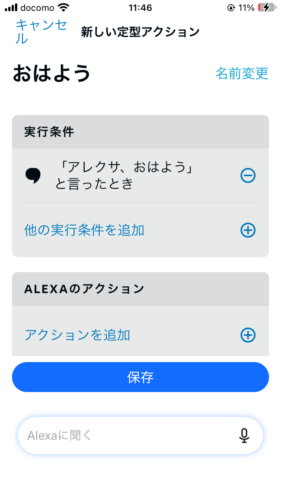
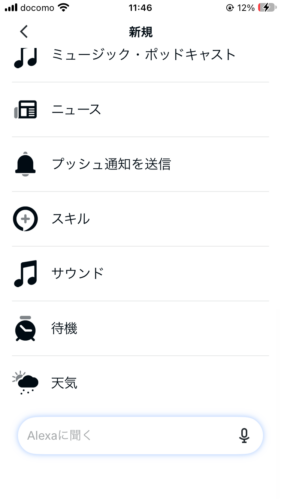
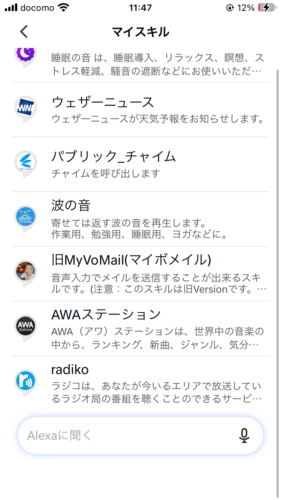
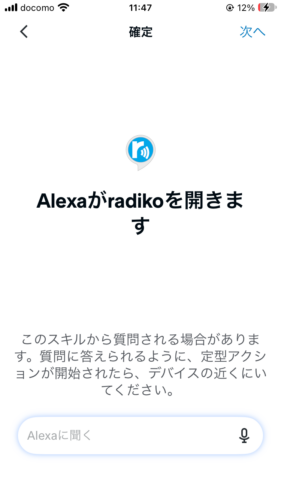
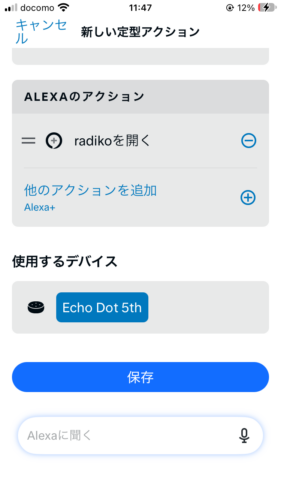
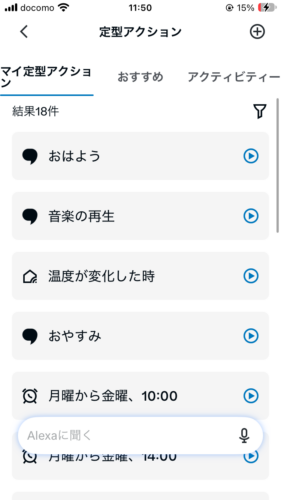
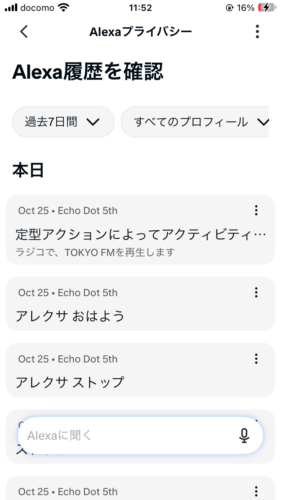
💡 The catch: a routine can’t pick a station. The most you can choose is “open radiko.” In my test, it simply played the last station I’d listened to (TOKYO FM). So tune in to your morning station the night before, and the routine takes care of the rest!
5. What Echo can’t do with radiko
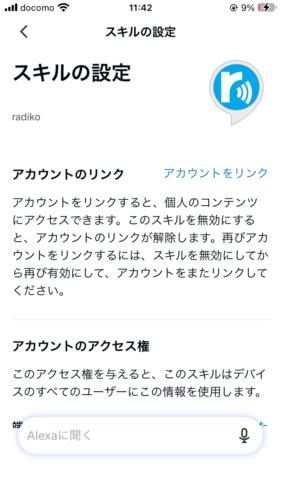
Stations outside your area. When I asked for Osaka’s ABC Radio, Alexa said it couldn’t play it in my current area. To listen nationwide, you need radiko Premium (Area Free). The skill’s settings include an account-linking option, which is how Premium members connect their radiko account. I didn’t test a Premium account this time.
Catch-up listening (time-free). I asked for a show that had aired earlier the same day. Alexa ignored the show and played the station’s live broadcast instead.
Timefree 30. radiko’s paid plan for shows from the past 30 days. radiko’s own site says it isn’t available on smart speakers.
| radiko Premium plan | Monthly price (incl. tax) | What you get |
|---|---|---|
| Area Free | ¥385 | Stations from all over Japan |
| Timefree 30 | ¥480 | Unlimited replays of the past 30 days (not on smart speakers) |
| Double Plan | ¥865 | Both of the above |
Prices are for sign-ups on the radiko website, and your first month is free (checked October 2026). See radiko’s Premium page for the latest.
💡 Want catch-up shows through your Echo’s speaker anyway? Play them in the radiko app on your phone and pair your Echo Dot as a Bluetooth speaker.
6. Your postal code decides your stations
In the skill settings, radiko has permission to read your device’s country and postal code. That appears to be how it decides which local stations you get.
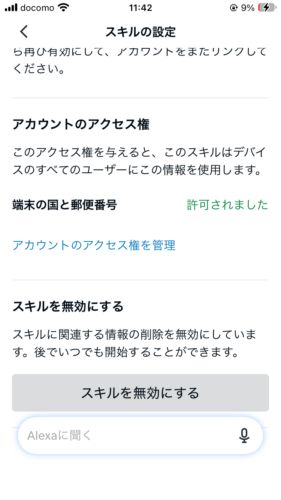
💡 Moved recently and still hearing your old local stations? Check that your Echo’s address in the Alexa app has the new postal code.
7. Check or delete your voice history
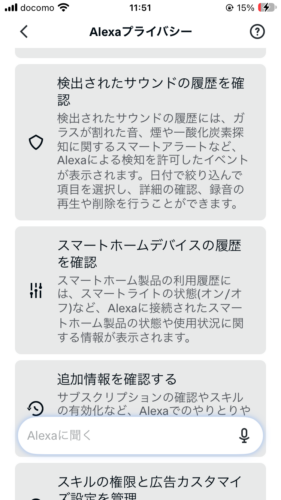
In the Alexa app, go to その他 (More) → Alexaプライバシー (Alexa Privacy) → Alexa履歴を確認 (Review Alexa history). You’ll see what you asked and what your routines did, and you can delete anything you don’t want kept.
8. The bottom line
- Setup takes under five minutes: just start the radiko skill in the Alexa app
- Say 「ラジコで」 + station name to play any station in your area, free
- 「次の局」 switches stations; 「30分後に止めて」 sets a sleep timer
- Routines can’t choose a station, but they play the last one you listened to
- Out-of-area stations need radiko Premium; catch-up and Timefree 30 don’t work on Echo
Wondering if your Echo is ready for Amazon’s next-gen assistant? See Does Your Echo Work with Alexa+? Shopping for one? Here’s my Echo Dot (5th Gen) review.
See the Echo Dot (5th Gen) on Amazon Japan
This article is based on hands-on testing by the author. AI tools such as Claude were used to assist with research and drafting, and the author reviewed the content before publishing.