
Missing BBC or NPR at home? TuneIn lets your Echo play radio from all over the world, even here in Japan!
I tested it on my Echo Dot (5th gen) in November 2026: the app settings, voice requests and a daily routine. The Alexa app screenshots are in Japanese, so I’ve added English for every label. One big catch: Alexa often played a different station from the one I asked for. Here’s what happened and how to work around it.
💡 Quick answer
・TuneIn comes built into Alexa and is free
・Asking for a station by name often played a similarly named station somewhere else
・For the real BBC, skip TuneIn and just say 「アレクサ、BBCワールドニュース」. That played BBC World Service for me
・For Japanese stations, use radiko. For overseas stations, use TuneIn
・For a station you play every day, save it in a routine
1. What TuneIn is
TuneIn streams radio stations and podcasts from around the world. TuneIn’s help center says it comes “preloaded on all Alexa-enabled devices” with free FM, AM, internet radio and podcasts (TuneIn Help). The paid TuneIn Live skill (live sports and more) is separate, and the page doesn’t say whether it works in Japan. This guide covers the free version.
| TuneIn | radiko | |
|---|---|---|
| Best for | Overseas stations | Japanese stations in your area |
| Cost | Free | Free in your area |
| Asking by voice | May pick a similar name | Plays when you just ask for the radio |
For Japanese radio, see how to use radiko on your Echo Dot.
2. Check TuneIn in the Alexa app
Alexa can use the music services shown in your Alexa app (Amazon help, in Japanese). Here’s where I found TuneIn in the app in November 2026.
- On the home screen, open ミュージックハブ (Music hub) under お気に入り (Favorites)
- Tap the gear icon at the top right to open ミュージック・ポッドキャスト (Music and podcasts)
- Look for TuneIn under 家族で使用するサービス (Services for your household)
- Tap TuneIn to see whether it’s linked
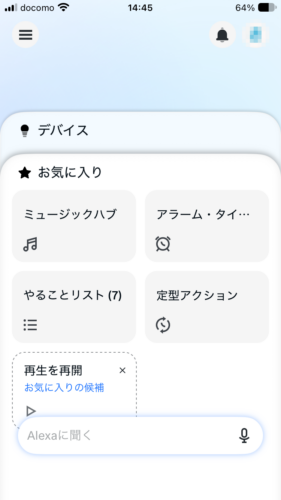
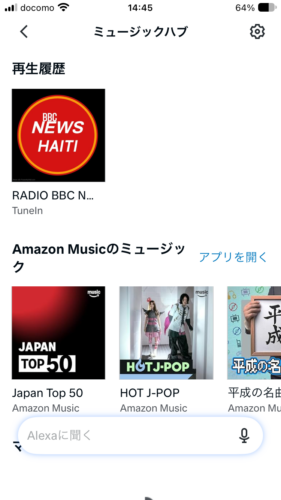
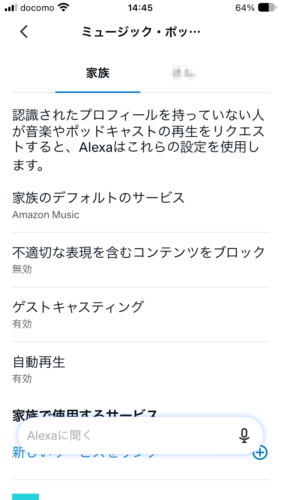
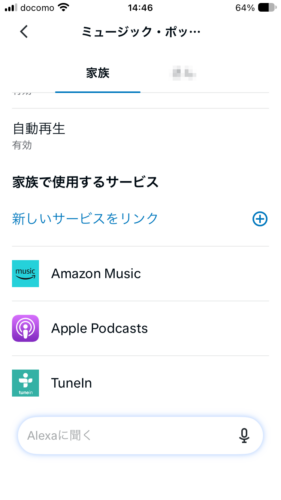
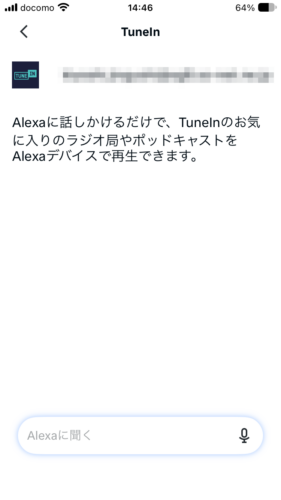
💡 Stations you’ve played on TuneIn show up under 再生履歴 (Recently played) in the Music hub. Tapping one there is the surest way to get the same station again.
3. What happened when I asked by voice
Amazon says you can ask Alexa to play a station by name (Amazon help, in Japanese). My Echo is set to Japanese, so these are the Japanese phrases I used.
| What I said | What played |
|---|---|
| アレクサ、TuneInでJ-WAVEをかけて (Arekusa, TuneIn de J-WAVE o kakete) (“Alexa, play J-WAVE on TuneIn”) | Mew Wave Radio, an online station in the US |
| アレクサ、TuneInでBBCラジオ1をかけて (Arekusa, TuneIn de BBC rajio wan o kakete) (“Alexa, play BBC Radio 1 on TuneIn”) | WFDD, a US station |
| Same request for BBC World Service | First “Radio BBC News Haiti”, then KUT (Austin, Texas) |
| Same request for NHK Radio 1 | The screen showed “Nhk Radio” |
| アレクサ、TuneInでラジオをかけて (Arekusa, TuneIn de rajio o kakete) (“Alexa, play the radio on TuneIn”) | The last station I played (KUT) |
| アレクサ、ラジオをかけて (Arekusa, rajio o kakete) (“Alexa, play the radio”) | Radio NIKKEI on radiko |
| アレクサ、BBCワールドニュース (Arekusa, BBC wārudo nyūsu) (“Alexa, BBC World News”) (no “TuneIn”) | 「BBCワールドサービスから」 (From BBC World Service), and the real BBC World Service played |
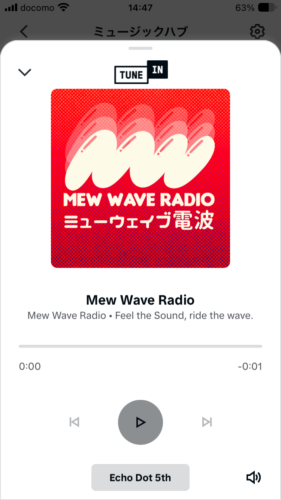
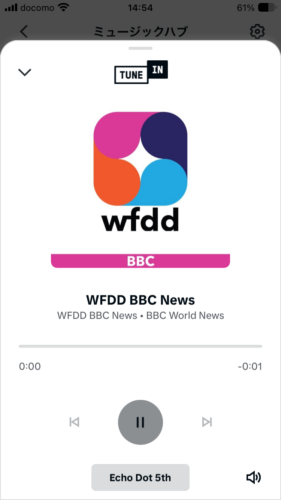
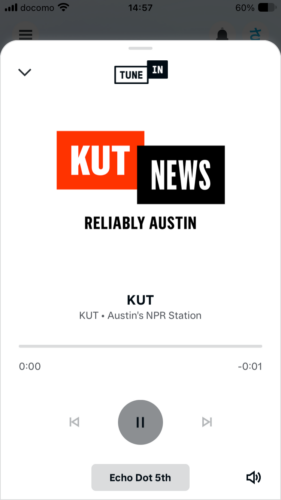
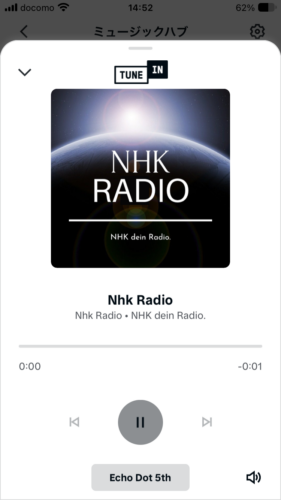
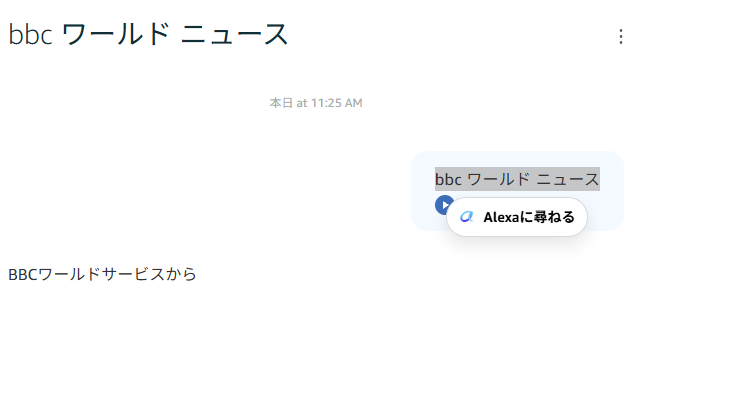
💡 TuneIn has stations from all over the world, so Alexa often grabs one with a similar name. Without “TuneIn de” in the request, Alexa may go to radiko instead.
This isn’t new. Readers of my old blog reported back in 2019 that BBC was easy to get, but most other stations weren’t recognized.
4. Four ways to get the right station
- Leave out “TuneIn”: I really wanted the real BBC, so I just said アレクサ、BBCワールドニュース (Arekusa, BBC wārudo nyūsu) (“Alexa, BBC World News”). Alexa answered 「BBCワールドサービスから」 (From BBC World Service) and played the actual broadcast. That worked better than asking through TuneIn
- Pick from Recently played: Once a station has played, tap it in the Music hub
- Save it in a routine: The routine plays the same station every time (see the next section)
- Try English: A reader of my old blog switched Alexa to English and found stations easily by their call letters, like KUSC. You can ask Alexa 「日本語と英語で話して」 (Nihongo to eigo de hanashite, “Speak Japanese and English”) to use both languages (Amazon help, in Japanese), or change the device language in the app (Amazon help, in Japanese). I haven’t tested this myself yet
5. Play a station every day with a routine
Routines let you pick a TuneIn station and play it automatically. I made one that plays every day at 7 p.m.
- Open 定型アクション (Routines) and tap + at the top right
- 実行条件を追加 (Add a trigger) → スケジュール (Schedule) → repeat 毎日 (Every day), time 19:00
- アクションを追加 (Add an action) → ミュージック・ポッドキャスト (Music and podcasts)
- Type the station name and choose TuneIn as the プロバイダー (Provider)
- Pick your Echo Dot under 応答するデバイス (Device) and tap 保存 (Save)
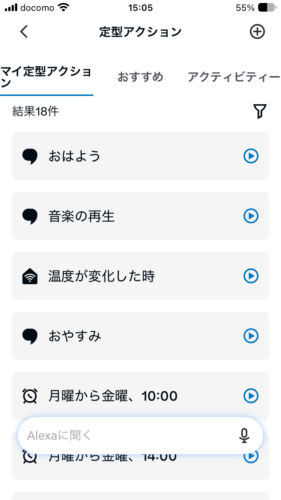
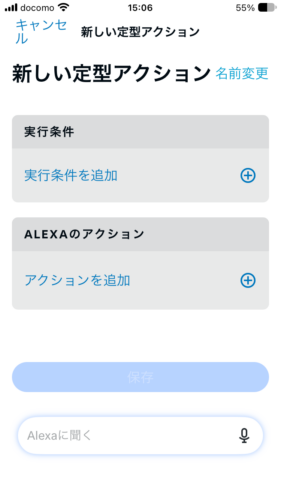
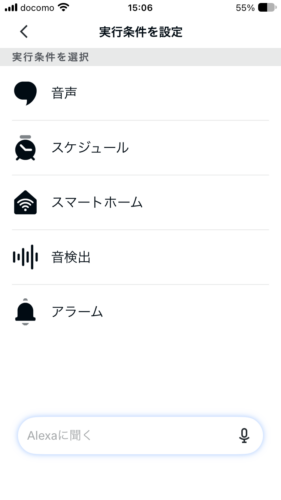
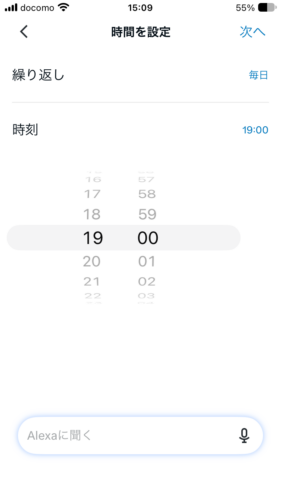
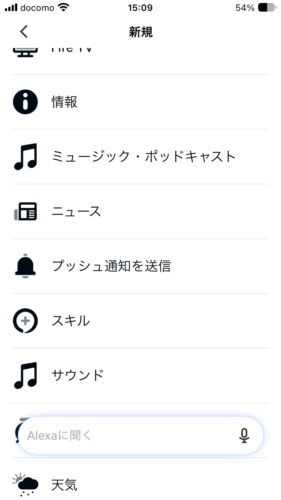
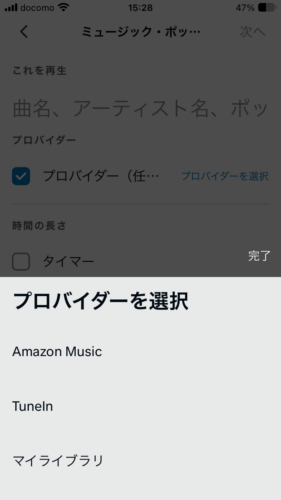
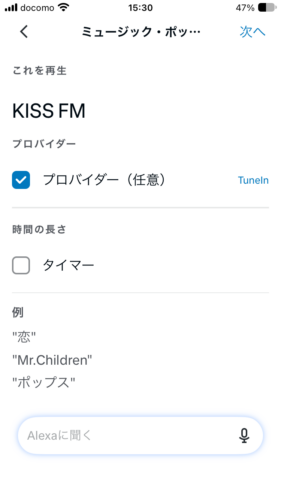
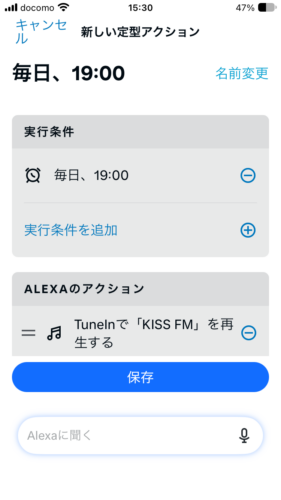
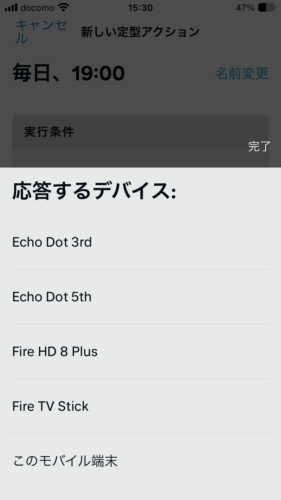
When I typed “KISS FM”, the routine played “KISS FM L’ESPRIT DU SUD”, which looks like a station in the south of France (Jingle News). So many stations share a name that this happens a lot.
💡 Routines also search by name, so play your new routine once to check it picks the station you want.
6. When TuneIn won’t play
Amazon suggests these fixes when music or radio won’t play or keeps buffering (Amazon help, in Japanese):
- Turn off devices you aren’t using to free up Wi-Fi
- Move the Echo away from walls, metal and microwaves
- Move it off the floor to a higher spot
- Connect to your router’s 5 GHz band
- Restart your Echo and your router
To reconnect Wi-Fi, see how to change Wi-Fi on your Echo Dot. If the wrong station plays, try the tips in section 4.
7. TuneIn or radiko?
| You want | Use | Say |
|---|---|---|
| Japanese stations in your area | radiko | アレクサ、ラジオをかけて |
| News and music from overseas | TuneIn | アレクサ、TuneInで(station name)をかけて |
| The same station every day | Either | Save it in a routine |
Voices on the radio hard to hear? Try my Echo Dot equalizer settings.
8. The bottom line
| What you want | How |
|---|---|
| Check TuneIn | Music hub → gear icon → Music and podcasts |
| Play by voice | アレクサ、TuneInで(station name)をかけて |
| Play the BBC | Say アレクサ、BBCワールドニュース (no “TuneIn”) |
| Wrong station? | Pick from Recently played, or save it in a routine |
| Play daily | Routines → Music and podcasts → provider TuneIn |
| Japanese radio | Use radiko |
Shopping for an Echo Dot? Check the Echo Dot (6th gen) or the Echo Dot (5th gen) on Amazon Japan for current prices.
Sources: TuneIn Help: Isn’t TuneIn already available on Alexa?, Amazon: Music services you can use with Alexa, Amazon: Play music with voice commands, Amazon: When media or music won’t play, Amazon: Ask Alexa to speak more than one language (all checked November 18, 2026; Amazon pages are in Japanese)