
Is your Echo Dot’s voice a little muffled? Want your music to sound punchier? The equalizer is the fix!
I updated this guide in November 2026 after checking every screen and voice command on my Echo Dot (5th gen) and Echo Dot (3rd gen), here in Japan. I also played the same song with four different settings on both. The Alexa app screenshots are in Japanese, so I’ve added English for every label.
💡 Quick answer
・Clearer voices: bass -2 / mid +3 / treble +1 (on the 5th gen, mid +5 is even crisper)
・Punchier music: bass +3 / mid 0 / treble +3
・At night, turning the volume down works better than any EQ setting
・Changing it by voice? Do it while music is playing. 「イコライザーをリセットして」 puts everything back to 0
1. What the equalizer does
The equalizer changes the balance between low, middle and high sounds. Your Echo Dot has three bands.
| Label in the app | What it is | Good for |
|---|---|---|
| バス (Bass) | Low end | Bass, drums, movie effects |
| ミドル (Mid) | Middle | Voices, vocals, piano |
| トレブル (Treble) | High end | Cymbals, strings, crisp detail |
Each band goes from -6 to +6 (Amazon help, in Japanese). Amazon also notes that some devices may not have an equalizer option (Amazon help, in Japanese).
2. How to change it in the Alexa app
Amazon’s help page says: Devices → pick your device → Device Settings → Sound → Equalizer (Amazon help, in Japanese). Here’s what that looked like in the app in November 2026.
- Open デバイス (Devices) and tap your Echo Dot
- Tap the gear icon at the top right to open デバイスの設定 (Device Settings)
- Tap サウンド (Sound)
- Under オーディオの設定 (Audio settings), tap イコライザー (Equalizer)
- Slide バス / ミドル / トレブル (Bass / Mid / Treble). The − and + buttons move them one step at a time
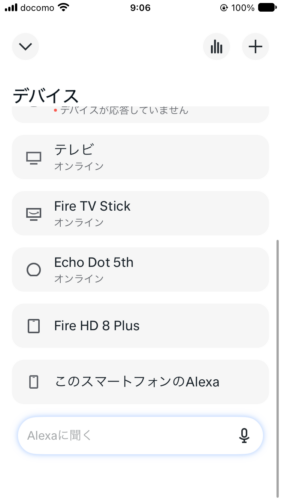
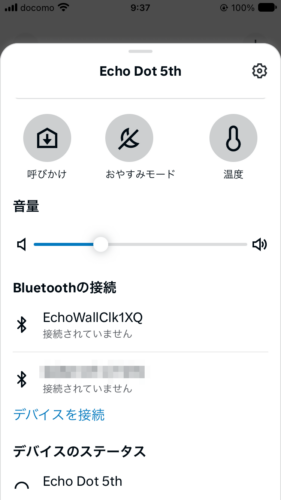
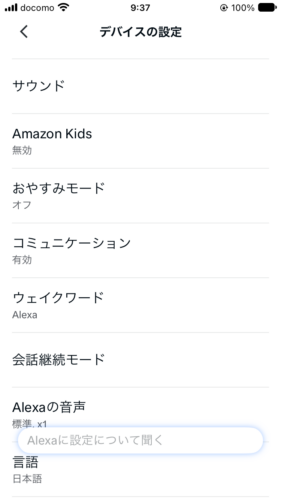
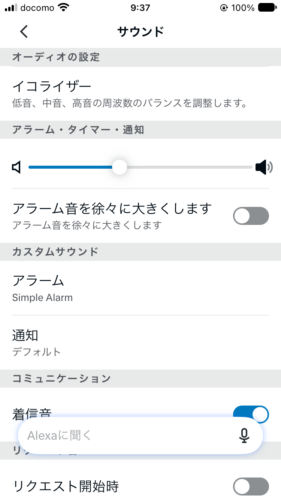
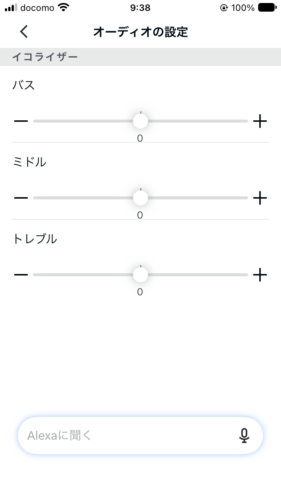
💡 The 3rd gen had the exact same screens. Settings are saved per Echo, so each room can sound different.
The Echo Dot Max (2025) uses the same steps, according to the Q&A on its Amazon Japan product page.
3. Changing it by voice
My Echo Dots are set to Japanese, so here are the Japanese phrases from Amazon’s help page (Amazon help, in Japanese):
- アレクサ、低音を上げて/下げて (Arekusa, teion o agete / sagete) (“Alexa, turn the bass up / down”). Swap 低音 (teion) for 中音 (chūon, mid) or 高音 (kōon, treble)
- アレクサ、中音を3に設定して (Arekusa, chūon o san ni settei shite) (“Alexa, set the mid to 3”). Any number from -6 to 6 works
- アレクサ、イコライザーをリセットして (Arekusa, ikoraizā o risetto shite) (“Alexa, reset the equalizer”)
On my 5th gen, it made a big difference whether something was playing.
| What I said | Nothing playing | Music playing |
|---|---|---|
| Turn the bass down | No reply | No reply, but the sound changed and Bass went down in the app |
| Set the mid to 3 | No reply | No reply, but the sound changed and Mid moved to 3 in the app |
| Reset the equalizer | “OK, I’ve reset the equalizer” | “OK, I’ve reset the equalizer” and everything went back to 0 |
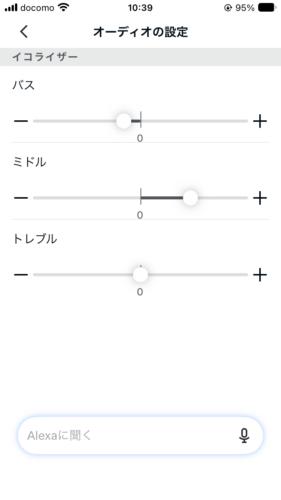
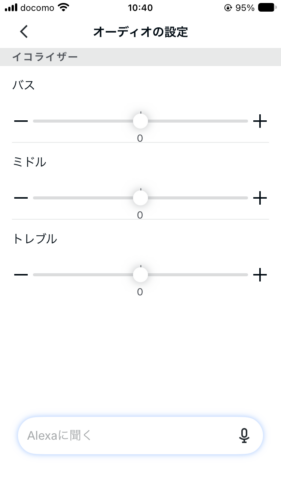
💡 When you change the EQ by voice, play some music first. Alexa may not answer, but you’ll hear the change right away. Lost? Just ask Alexa to reset the equalizer.
4. Settings I tested side by side
I played the same song with vocals on both Echo Dots and switched between four settings.
| Setting (bass / mid / treble) | 3rd gen | 5th gen |
|---|---|---|
| A. Default (0 / 0 / 0) | Baseline | Baseline |
| B. Clearer voices (-2 / +3 / +1) | Vocals come forward | Vocals come forward. Even crisper with mid at +5 |
| C. Music (+2 / 0 / +2) | Bass and keyboards stand out | Bass and keyboards stand out. +3 / 0 / +3 gave sharper detail |
| D. Night, low volume (-3 / +2 / 0) | Not much different | Not much different |
So here’s what I use now:
| For | 3rd gen | 5th gen |
|---|---|---|
| News, radio, podcasts | -2 / +3 / +1 | -2 / +5 / +1 |
| Music | +2 / 0 / +2 | +3 / 0 / +3 |
| Night | Keep 0 / 0 / 0 and lower the volume | Keep 0 / 0 / 0 and lower the volume |
💡 Your room and your ears matter. Start with B or C, then nudge one slider at a time.
Listening to Japanese radio? The voice setting works great with radiko on your Echo Dot.
5. 3rd gen, 5th gen and the newer models
The 3rd and 5th gen had the same screens and voice commands. On the 5th gen, pushing the numbers a bit further sounded better (mid +5, or bass and treble +3).
The Echo Dot (6th gen), released in October 2026, is said to have 1.5x the bass of the 5th gen (Techno Edge, in Japanese). The Echo Dot Max has a two-way speaker and room adaptation, and two of them can be paired for stereo (product page). I don’t own either, so I haven’t tested how they sound with the EQ.
💡 Too much bass, or sounds muffled? Try setting B first. Owners of an Echo (note, in Japanese) and an Echo Dot Max (an owner report quoted here, in Japanese) say lowering the bass and raising the mid and treble helped.
6. When the EQ doesn’t seem to work
- Playing through a Bluetooth speaker: When I sent my Echo Dot’s sound to a soundbar, the Echo’s EQ had no effect. Adjust the sound with the speaker’s own remote or settings instead (how to connect: use your Echo Dot with Bluetooth speakers)
- No reply to a voice command: Play music and try again, then check the numbers on the Equalizer screen
- No equalizer option: Amazon says some devices can’t adjust it (Amazon help, in Japanese)
7. More ways to get better sound
Try a stereo pair! Put two of the same Echo Dot side by side and you get left and right stereo sound. Only certain models can be paired (Amazon help: Echo devices that support stereo pairs, in Japanese).
| Your Echo Dot | Can pair with |
|---|---|
| 3rd gen | 3rd gen / Echo Dot with clock |
| 5th gen | 5th gen / 4th gen (incl. with clock) |
| 6th gen | 6th gen |
| Echo Dot Max | Echo Dot Max |
Every model can also add an Echo Sub for deeper bass. Heads-up: the 3rd and 5th gen can’t be paired with each other.
- Want more punch? Play through a Bluetooth speaker or soundbar you already have (Bluetooth guide)
- The 3rd gen also has an audio out jack, so you can plug in a speaker with a cable (the 5th gen doesn’t)
8. The bottom line
| What you want | How |
|---|---|
| Change it in the app | Devices → Echo Dot → gear icon → Sound → Equalizer |
| Change it by voice | Play music, then say アレクサ、中音を3に設定して |
| Reset | アレクサ、イコライザーをリセットして |
| Clearer voices | -2 / +3 to +5 / +1 |
| Punchier music | +2 to +3 / 0 / +2 to +3 |
| Night | Lower the volume instead |
Shopping for an Echo Dot? Check the Echo Dot (6th gen), the Echo Dot (5th gen) or the Echo Dot Max on Amazon Japan for current prices.
Sources: Amazon: Adjust bass, treble and midrange in the Alexa app, Amazon: Adjust bass, treble and midrange on your Echo by voice, Amazon: Echo devices that support stereo pairs, Amazon: Echo Dot Max product page (all checked November 5, 2026; Amazon pages are in Japanese)